
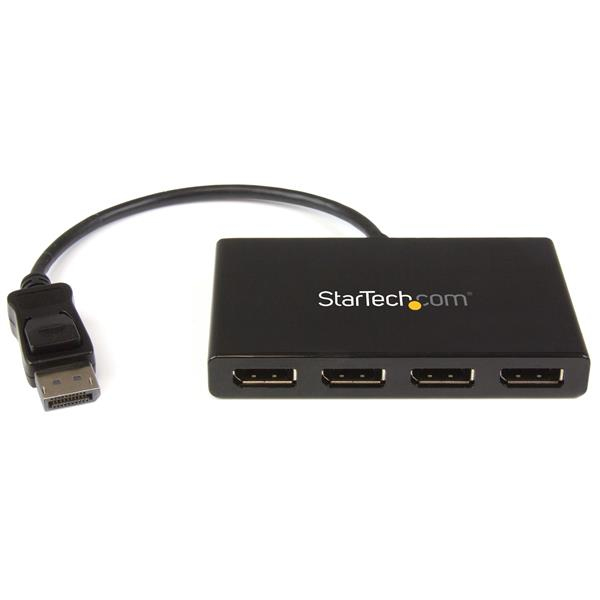
StarTech MST Hub DisplayPort to 4x DisplayPort
DP 1.2 to 4x DP MST Hub
Brand: StarTech.com
SKU: MSTDP124DP
£112.85
Price excl. VAT
£135.42
Price incl. VAT
Out of stock

Do you have any question about this product? Click here to contact our pre-sales consultant and make the right purchase.

Buy with confidence: honest stock, fair trade terms
Better prices with correct stock availability, and secure payments with full transparency.
- Aggregated live stock: availability shown is the combined aggregated stock of our warehouses and partner distributors, updated in real time. If it says available, it is available.
- No charge until confirmed: your payment is only reserved at checkout and is charged once your item is secured.
- 24-hour free cancellation: changed your mind? Cancel within 24 hours and the reserved payment is released in full.
- Stock sold out? Full refund: if an item becomes unavailable after you order, we cancel and release or refund 100% of your payment.
- From Our Warehouse to Your Door. every order is checked, packed at our warehouses and dispatched with DHL Express, UPS or FedEx as DDP – No customs or duties to pay. No hidden charges
- Fair cancellation and return terms: for late cancellations or returns of expensive, special-order items without a fault, a fee of up to 5-10% may apply, covering only actual shipping and handling costs to sustain our business. Faulty items and RMA cases are never charged. No late-payment fees, no interest ever. Full terms
 NOTE: The information below is provided for your convenience only; the accuracy of the specifications cannot be guaranteed. However, if necessary, please check with us before purchasing. Data provided by 1 World Sync.
General
Video port type
DisplayPort
Video out
4x DisplayPort
Maximum resolution
3840 x 2160 pixels
Product colour
Black
Housing material
Plastic
AC input voltage
110 - 240 V
Input current
0.5 A
Output voltage
5 V
Width
65 mm
Depth
386 mm
Height
15 mm
Package width
241 mm
Package depth
152 mm
Package height
64 mm
StarTech.com 4-Port Multi Monitor Adapter - DisplayPort 1.2 MST Hub - 4x 1080p - DisplayPort Video Splitter for Extended Desktop Mode on Windows PCs Only - DP to Quad DP Monitors. Video port type: DisplayPort, Video out: 4x DisplayPort. Maximum resolution: 3840 x 2160 pixels, Product colour: Black, Housing material: Plastic. AC input voltage: 110 - 240 V, Input current: 0.5 A, Output voltage: 5 V. Width: 65 mm, Depth: 386 mm, Height: 15 mm. Package width: 241 mm, Package depth: 152 mm, Package height: 64 mm
| Estimate Gross Weight | 0.527 |
|---|
https://www.startech.com/en-us/MSTDP124DP
Use this adapter to connect four independent displays to a single DP 1.2 portThis MST hub lets you connect four monitors to your DisplayPort™ (DP) 1.2 equipped Windows® laptop or desktop.Increase productivity with multiple screensThe newest generations of computers are more portable than ever, which often means that you’re left with fewer video outputs and smaller integrated screens. This MST hub solves both of these problems by letting you connect four additional displays to your computer, which makes multitasking much easier.Connect to any displayWith the MST hub, you can use DisplayPort video adapters and cable adapters that enable you to connect HDMI, VGA or DVI displays. This ensures your MST hub will be compatible with virtually any television, monitor or projector. This MST hub is VESA and DisplayPort certified to support DP 1.2 enabled systems, for seamless integration with your existing video equipment.Configure your displays for any environmentUsing the MST hub, you can extend your desktop onto additional monitors and stream independent content to each display giving you the freedom to multitask and increase your productivity. You can also mirror the same image onto multiple displays for remote viewing applications such as digital signage.Enjoy amazing video quality, without draining system resourcesMST technology uses your existing video card to minimize the use of system resources while delivering Ultra HD 4K resolutions. This unprecedented performance makes MST perfect for high-resolution applications such as graphic design, gaming and medical imaging.Note: When using a DisplayPort 1.1 video card the MST hub will act as a splitter, automatically mirroring your video source across all displays. Resolution limitations apply.The MSTDP124DP supports plug-and-play installation for a hassle-free setup, and is backed by a StarTech.com 3-year warranty and free lifetime technical support.Note: MST shares 21.6 Gbps across all attached displays. Higher resolutions can restrict the available bandwidth with the remaining ports, please see our guideline below for determining an ideal resolution for your setup. Certain graphics adapters have limited MST support and will only output to three displays in total. If more than three monitors are attached the fourth will be disabled.Average resolution bandwidth allocation:1920x1080 (High-definition 1080p) @60hz - 22%1920x1200 @60hz - 30%2560x1440 @60hz - 35%2560x1600 @60hz - 38%3840 x 2160 (Ultra HD 4K) @30hz - 38%Note: Exceeding 100% will reduce functionality.Examples of supported resolution configurations:Screen 1 ResolutionScreen 2 ResolutionScreen 3 ResolutionScreen 4 ResolutionTotal % of Bandwidth1920x1080 @60hz (22%)1920x1080 @60hz (22%)1920x1080 @60hz (22%)1920x1080 @60hz (22%)88%1920x1200 @60hz (30%)1920x1080 @60hz (22%)1920x1080 @60hz (22%)1920x1080 @60hz (22%)96%3840x2160 @30hz (38%)1920x1080 @60hz (22%)1920x1080 @60hz (22%)off82%3840x2160 @30hz (38%)1920x1200 @30hz (30%)1920x1080 @60hz (22%)off90%Examples of unsupported resolution configurationsScreen 1 ResolutionScreen 2 ResolutionScreen 3 ResolutionScreen 4 ResolutionTotal % of Bandwidth2560x1600 @60hz (38%)2560x1600 @60hz (38%)1920x1200 @60hz (30%)1920x1200 @60hz (30%)136%3840x2160 @30hz (38%)2560x1600 @60hz (38%)1920x1200 @60hz (30%)1920x1200 @60hz (30%)136%3840x2160 @30hz (38%)2560x1600 @60hz (38%)2560x1440 @60hz (35%)1920x1200 @60hz (30%)141%3840x2160 @30hz (38%)3840x2160 @30hz (38%)3840x2160 @30hz (38%)off114%The StarTech.com Advantage
Use this adapter to connect four independent displays to a single DP 1.2 portThis MST hub lets you connect four monitors to your DisplayPort™ (DP) 1.2 equipped Windows® laptop or desktop.Increase productivity with multiple screensThe newest generations of computers are more portable than ever, which often means that you’re left with fewer video outputs and smaller integrated screens. This MST hub solves both of these problems by letting you connect four additional displays to your computer, which makes multitasking much easier.Connect to any displayWith the MST hub, you can use DisplayPort video adapters and cable adapters that enable you to connect HDMI, VGA or DVI displays. This ensures your MST hub will be compatible with virtually any television, monitor or projector. This MST hub is VESA and DisplayPort certified to support DP 1.2 enabled systems, for seamless integration with your existing video equipment.Configure your displays for any environmentUsing the MST hub, you can extend your desktop onto additional monitors and stream independent content to each display giving you the freedom to multitask and increase your productivity. You can also mirror the same image onto multiple displays for remote viewing applications such as digital signage.Enjoy amazing video quality, without draining system resourcesMST technology uses your existing video card to minimize the use of system resources while delivering Ultra HD 4K resolutions. This unprecedented performance makes MST perfect for high-resolution applications such as graphic design, gaming and medical imaging.Note: When using a DisplayPort 1.1 video card the MST hub will act as a splitter, automatically mirroring your video source across all displays. Resolution limitations apply.The MSTDP124DP supports plug-and-play installation for a hassle-free setup, and is backed by a StarTech.com 3-year warranty and free lifetime technical support.Note: MST shares 21.6 Gbps across all attached displays. Higher resolutions can restrict the available bandwidth with the remaining ports, please see our guideline below for determining an ideal resolution for your setup. Certain graphics adapters have limited MST support and will only output to three displays in total. If more than three monitors are attached the fourth will be disabled.Average resolution bandwidth allocation:1920x1080 (High-definition 1080p) @60hz - 22%1920x1200 @60hz - 30%2560x1440 @60hz - 35%2560x1600 @60hz - 38%3840 x 2160 (Ultra HD 4K) @30hz - 38%Note: Exceeding 100% will reduce functionality.Examples of supported resolution configurations:Screen 1 ResolutionScreen 2 ResolutionScreen 3 ResolutionScreen 4 ResolutionTotal % of Bandwidth1920x1080 @60hz (22%)1920x1080 @60hz (22%)1920x1080 @60hz (22%)1920x1080 @60hz (22%)88%1920x1200 @60hz (30%)1920x1080 @60hz (22%)1920x1080 @60hz (22%)1920x1080 @60hz (22%)96%3840x2160 @30hz (38%)1920x1080 @60hz (22%)1920x1080 @60hz (22%)off82%3840x2160 @30hz (38%)1920x1200 @30hz (30%)1920x1080 @60hz (22%)off90%Examples of unsupported resolution configurationsScreen 1 ResolutionScreen 2 ResolutionScreen 3 ResolutionScreen 4 ResolutionTotal % of Bandwidth2560x1600 @60hz (38%)2560x1600 @60hz (38%)1920x1200 @60hz (30%)1920x1200 @60hz (30%)136%3840x2160 @30hz (38%)2560x1600 @60hz (38%)1920x1200 @60hz (30%)1920x1200 @60hz (30%)136%3840x2160 @30hz (38%)2560x1600 @60hz (38%)2560x1440 @60hz (35%)1920x1200 @60hz (30%)141%3840x2160 @30hz (38%)3840x2160 @30hz (38%)3840x2160 @30hz (38%)off114%The StarTech.com Advantage
- MULTI-MONITOR CONFIGURATION: Quad-Monitor DisplayPort 1.2 MST Hub drives up to 4x 1080p 60Hz DisplayPort monitors using a DP video port on a Windows desktop PC or laptop; Not compatible with macOS
- NO DRIVERS OR SOFTWARE: Increase productivity by adding four extended or mirrored displays to a Windows computer; Utilize integrated or discrete GPU (Intel/AMD/Nvidia) capabilities enabling high performance graphics with minimal CPU usage
- HARDWARE COMPATIBILITY: Host system must support DP 1.2 / HBR2 / MST; Please verify maximum number of displays supported by your GPU; Some GPU chips (such as Intel HD Graphics) are only capable of supporting a maximum of three displays;
- EASY TO USE: Extend your desktop at your workstation in the office/home office; Latching DisplayPort connector ensures a reliable connection and prevents accidental disconnection; Not compatible with HDMI output ports; Universal Power Adapter included
- OUR ADVANTAGE: Included connectivity tools for IT Pro's and IT help-desk support teams with Windows Layout Utility which restores windows app locations when re-connecting the 4-Port DisplayPort Multi-Monitor Adapter
0.0
0 review(s)
In the building · Real shipments · Real operations
Goods in. Goods out. Real Tech, Moving Daily.
A snapshot of the technology we receive, handle, pack and dispatch. These images are captured on site or at customer locations — not from a stock library.