
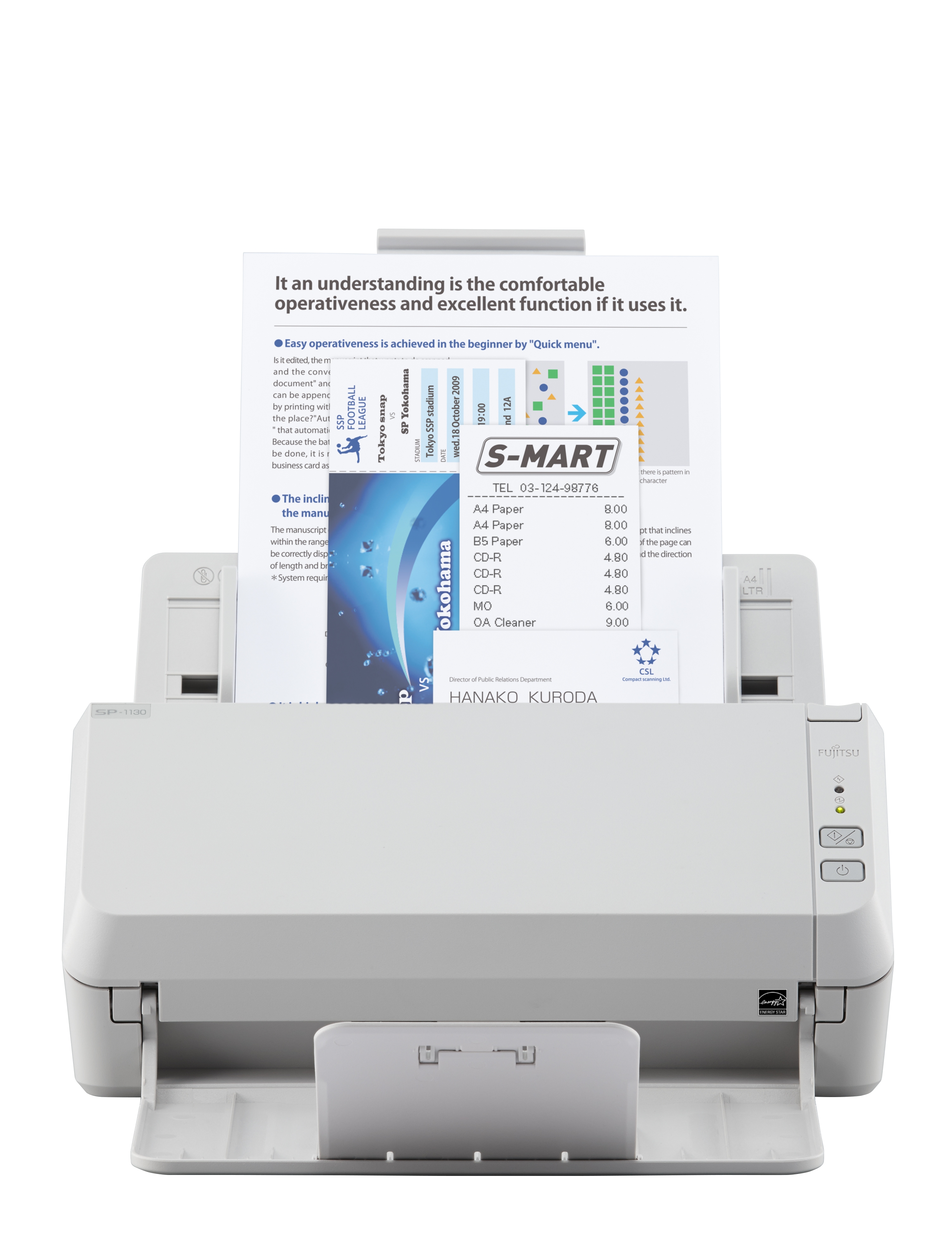
Fujitsu SCANSNAP SP-1130 Dokumentenscanner Duplex, TWAIN/ISIS Unterstützung
SP-1120 - ADF - Colour CIS x 2 - 50 - 209 g/m2 - 600dpi - USB 2.0 - 18W - 2.5kg
Brand: Fujitsu Technology
SKU: PA03708-B021
£0.00
Price excl. VAT
£0.00
Price incl. VAT
Out of stock

Do you have any question about this product? Click here to contact our pre-sales consultant and make the right purchase.

Buy with confidence: honest stock, fair trade terms
Better prices with correct stock availability, and secure payments with full transparency.
- Aggregated live stock: availability shown is the combined aggregated stock of our warehouses and partner distributors, updated in real time. If it says available, it is available.
- No charge until confirmed: your payment is only reserved at checkout and is charged once your item is secured.
- 24-hour free cancellation: changed your mind? Cancel within 24 hours and the reserved payment is released in full.
- Stock sold out? Full refund: if an item becomes unavailable after you order, we cancel and release or refund 100% of your payment.
- From Our Warehouse to Your Door. every order is checked, packed at our warehouses and dispatched with DHL Express, UPS or FedEx as DDP – No customs or duties to pay. No hidden charges
- Fair cancellation and return terms: for late cancellations or returns of expensive, special-order items without a fault, a fee of up to 5-10% may apply, covering only actual shipping and handling costs to sustain our business. Faulty items and RMA cases are never charged. No late-payment fees, no interest ever. Full terms
 NOTE: The information below is provided for your convenience only; the accuracy of the specifications cannot be guaranteed. However, if necessary, please check with us before purchasing. Data provided by 1 World Sync.
General
Maximum scan size
216 x 3048 mm
Optical scanning resolution
600 x 600 DPI
Output colour depth
24 bit
Scanner type
ADF scanner
Product colour
White
Sensor type
Colour CIS
Light source
RGB LED
Scan drivers
ISIS,TWAIN
Maximum ISO A-series paper size
A4
Scanning media types supported
Plain paper
Auto Document Feeder (ADF) media weight
50 - 209 g/m²
Standard interfaces
USB 1.1,USB 2.0
Fujitsu SP-1130. Maximum scan size: 216 x 3048 mm, Optical scanning resolution: 600 x 600 DPI, Output colour depth: 24 bit. Scanner type: ADF scanner, Product colour: White. Sensor type: Colour CIS, Light source: RGB LED, Scan drivers: ISIS,TWAIN. Maximum ISO A-series paper size: A4, Scanning media types supported: Plain paper, Auto Document Feeder (ADF) media weight: 50 - 209 g/m². Standard interfaces: USB 1.1,USB 2.0
| Estimate Gross Weight | 3.729 |
|---|
https://www.fujitsu.com/
Versatile.
Entry point into professional document management
Resourceful.
Purpose built with impressive software suite for efficiency gains
Reliable.
Intuitively and dependably converts physical documents to digital format
Convenient.
Simple and easy to use design, ideal for desktop placement.
Raise your productivity with efficient image capture
Evolve from your physical to electronic documents with digital ease with the SP-1130. Create one single source reference for all your data by merging these with your digitally born documents. Gain the business advantages of working with more convenient, flexible and secure digital images using simple push button routines, the SP-1130 feature a simple operation panel with only 2 buttons (Scan / Stop and Power) as well as software enabled push button management.
Store, retrieve and manage your documents more productively, efficiently and cost effectively than paper records allow. At the same time actively embrace compliance risk avoidance concerns and increase your customerΓÇÖs satisfaction.
Cost effective high performance
Achieve more in less time. Remove your backlog of documents and transform mixed batches of different thicknesses and sizes including plastic cards into high quality images. The SP-1130 has been especially designed to provide a simple but efficient paper to digital document capture platform for all types of businesses looking to adopt a more systematic approach to regular document capture
Automatic size recognition and blank page removal simplifies scanning operations and
pre scan sorting thereby helping to save the inconvenience of fine tuning the document for the OCR process. Fujitsu scanners are renowned for their highly reliable paper handling capabilities and these help remove image capture disruptions to reduce document management overheads.
Desktop convenience
Measuring only 298 x 135 x 133 mm (W x D x H), the compact design of the SP-1130 model takes up minimal space on a busy desktop. The small footprint means these devices are always available and within reach for uninterrupted performance. Trade a small desktop space to reclaim a much larger space taken up by paper records.
Bundled with business enhancing functionality
Turn lifeless business records into searchable, secure yet dynamic documents that can
be fed into digital archives. The bundled version of ABBYY FineReader Sprint creates
searchable and editable files from your paper documents allowing you to retrieve information more efficiently at a future date (the OCR processing can handle 190 languages). Presto PageManager offers further possibilities for the enhancement, conversion, collaboration and organisation of your files.
Document handling and archiving confidence
Whether dealing with healthcare, legal, financial or other documents that need to comply with long term storage regulations the SP-1130 helps support the efficient on-ramp into your archives.
Faster throughput when it is needed
The SP-1130 model through their 50-sheet automatic document feeder (ADF) can process single or double sided pages at the same time. The SP-1130 can scan 30 A4 single sided pages per minute (ppm) or 60 images per minute (ipm).
PaperStream IP ΓÇô high quality image enhancement
PaperStream IP is the scanner driver for the SP-1130. In addition to being fully compliant with the industry standard TWAIN and ISIS interface, PaperStream IP incorporates as standard, highly sophisticated image processing that automatically applies features such as noise removal, background pattern removal and character augmentation to produce exceptionally clear, high quality images that are suitable for direct import into the usersΓÇÖ workflow.
PaperStream IP has an intuitive, easy to use interface that can be switched between Administrator or User mode to simplify the scanning process and reduce user error.
Additionally PaperStream IP also introduces a new Assisted Scanning mode, which allows the user to visually select the best quality image from a range of images of the page, rather than needing to manually fine tune the scanning parameters one by one.
PaperStream Capture Lite is a powerful application used to scan documents with the SP-1130. It is extremely easy-to-use and provides an interface similar to a mobile application that allows users with little scanning experience to use the scanner almost instantly. PaperStream Capture Lite is based on the ΓÇ£One Click CaptureΓÇ¥ concept, which promotes reducing the number of times to touch the screen. It is effective in the prevention of operational errors as well as streamlining repeated operations. PaperStream Capture Lite presents itself as an essential capture tool for feeding TIF, BMP or JPEG files into defined capture routines by simply selecting a pictogram presented on screen. The software can be downloaded from the website designated in the Setup DVD-ROM.
Versatile.
Entry point into professional document management
Resourceful.
Purpose built with impressive software suite for efficiency gains
Reliable.
Intuitively and dependably converts physical documents to digital format
Convenient.
Simple and easy to use design, ideal for desktop placement.
Raise your productivity with efficient image capture
Evolve from your physical to electronic documents with digital ease with the SP-1130. Create one single source reference for all your data by merging these with your digitally born documents. Gain the business advantages of working with more convenient, flexible and secure digital images using simple push button routines, the SP-1130 feature a simple operation panel with only 2 buttons (Scan / Stop and Power) as well as software enabled push button management.
Store, retrieve and manage your documents more productively, efficiently and cost effectively than paper records allow. At the same time actively embrace compliance risk avoidance concerns and increase your customerΓÇÖs satisfaction.
Cost effective high performance
Achieve more in less time. Remove your backlog of documents and transform mixed batches of different thicknesses and sizes including plastic cards into high quality images. The SP-1130 has been especially designed to provide a simple but efficient paper to digital document capture platform for all types of businesses looking to adopt a more systematic approach to regular document capture
Automatic size recognition and blank page removal simplifies scanning operations and
pre scan sorting thereby helping to save the inconvenience of fine tuning the document for the OCR process. Fujitsu scanners are renowned for their highly reliable paper handling capabilities and these help remove image capture disruptions to reduce document management overheads.
Desktop convenience
Measuring only 298 x 135 x 133 mm (W x D x H), the compact design of the SP-1130 model takes up minimal space on a busy desktop. The small footprint means these devices are always available and within reach for uninterrupted performance. Trade a small desktop space to reclaim a much larger space taken up by paper records.
Bundled with business enhancing functionality
Turn lifeless business records into searchable, secure yet dynamic documents that can
be fed into digital archives. The bundled version of ABBYY FineReader Sprint creates
searchable and editable files from your paper documents allowing you to retrieve information more efficiently at a future date (the OCR processing can handle 190 languages). Presto PageManager offers further possibilities for the enhancement, conversion, collaboration and organisation of your files.
Document handling and archiving confidence
Whether dealing with healthcare, legal, financial or other documents that need to comply with long term storage regulations the SP-1130 helps support the efficient on-ramp into your archives.
Faster throughput when it is needed
The SP-1130 model through their 50-sheet automatic document feeder (ADF) can process single or double sided pages at the same time. The SP-1130 can scan 30 A4 single sided pages per minute (ppm) or 60 images per minute (ipm).
PaperStream IP ΓÇô high quality image enhancement
PaperStream IP is the scanner driver for the SP-1130. In addition to being fully compliant with the industry standard TWAIN and ISIS interface, PaperStream IP incorporates as standard, highly sophisticated image processing that automatically applies features such as noise removal, background pattern removal and character augmentation to produce exceptionally clear, high quality images that are suitable for direct import into the usersΓÇÖ workflow.
PaperStream IP has an intuitive, easy to use interface that can be switched between Administrator or User mode to simplify the scanning process and reduce user error.
Additionally PaperStream IP also introduces a new Assisted Scanning mode, which allows the user to visually select the best quality image from a range of images of the page, rather than needing to manually fine tune the scanning parameters one by one.
PaperStream Capture Lite is a powerful application used to scan documents with the SP-1130. It is extremely easy-to-use and provides an interface similar to a mobile application that allows users with little scanning experience to use the scanner almost instantly. PaperStream Capture Lite is based on the ΓÇ£One Click CaptureΓÇ¥ concept, which promotes reducing the number of times to touch the screen. It is effective in the prevention of operational errors as well as streamlining repeated operations. PaperStream Capture Lite presents itself as an essential capture tool for feeding TIF, BMP or JPEG files into defined capture routines by simply selecting a pictogram presented on screen. The software can be downloaded from the website designated in the Setup DVD-ROM.
0.0
0 review(s)
In the building · Real shipments · Real operations
Goods in. Goods out. Real Tech, Moving Daily.
A snapshot of the technology we receive, handle, pack and dispatch. These images are captured on site or at customer locations — not from a stock library.